Blokflow: a kanban board for Storyblok workflows, from one prompt
I gave the Space Plugin generator an app it had never seen
TL;DR Blokflow shows a Storyblok workflow as a kanban board: one column per stage, one card per story, filtered to what is assigned to you. A coding agent built it from one sentence and the Space Plugin generator prompt, with sign-in, permissions, rate limits and a native look already taken care of. Open source.
Last week I published one prompt to build any Storyblok Space Plugin: everything I learned building a translation editor inside Storyblok, written down so a coding agent gets it right the first time. A prompt like that is only worth something if it works on an app it has never seen. So this morning I gave it one.
I wanted a board for Storyblok's workflow stages: one column per stage, one card per story, so a team sees at a glance what is drafting, in review and ready to publish. This is the whole prompt I started with:
Fetch and follow the Storyblok Space Plugin instructions at https://raw.githubusercontent.com/d12rio/storyblok-translatable-datasource-label-space-plugin/main/generator/PROMPT.md

The app to build would be a kanban board based on the Storyblok Workflow stages - showing Stories as cards, option to filter to currently assigned to the user that is logged in.
What came out is Blokflow, a kanban board that opens in the sidebar of any Storyblok space.
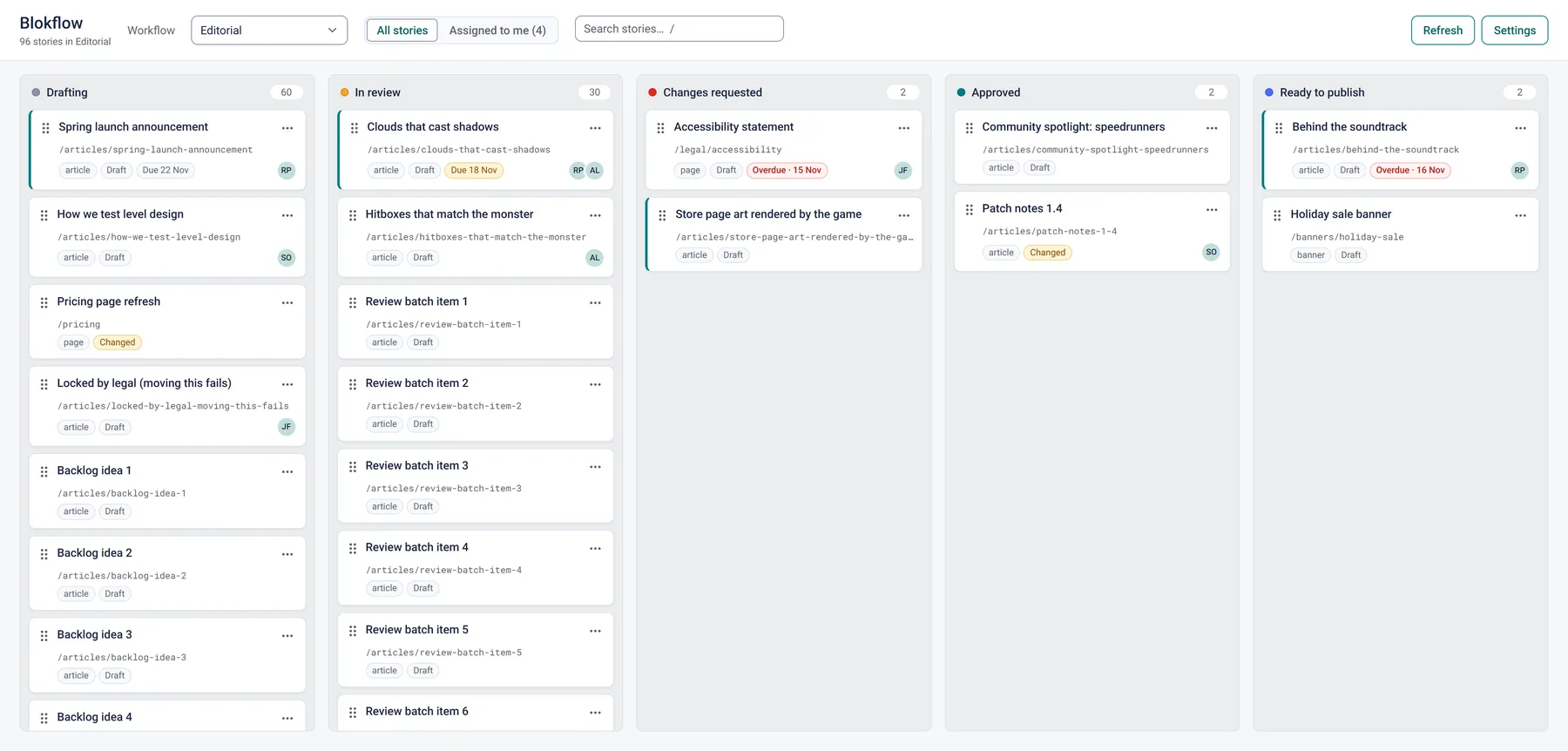
What Blokflow does
Each column is a stage of a workflow, in the workflow's order, with the full count of stories in it. Cards show the story's name, slug, content type, whether it is a draft or published, its due date and who it is assigned to.
Assigned to me narrows the board to your own stories, which was the one feature I asked for by name. Search asks Storyblok per stage, so it also finds stories that are not loaded yet. Columns load 25 stories at a time and fetch the next page as you scroll.
Moving a story works three ways: drag the card, use the keyboard (focus the grip, press Space, then the arrow keys), or pick a stage from the card's menu. Which moves are allowed is Storyblok's call, not the board's. If a workflow refuses a move, the card snaps back and shows Storyblok's reason. And a move only changes the stage: nothing is ever published.
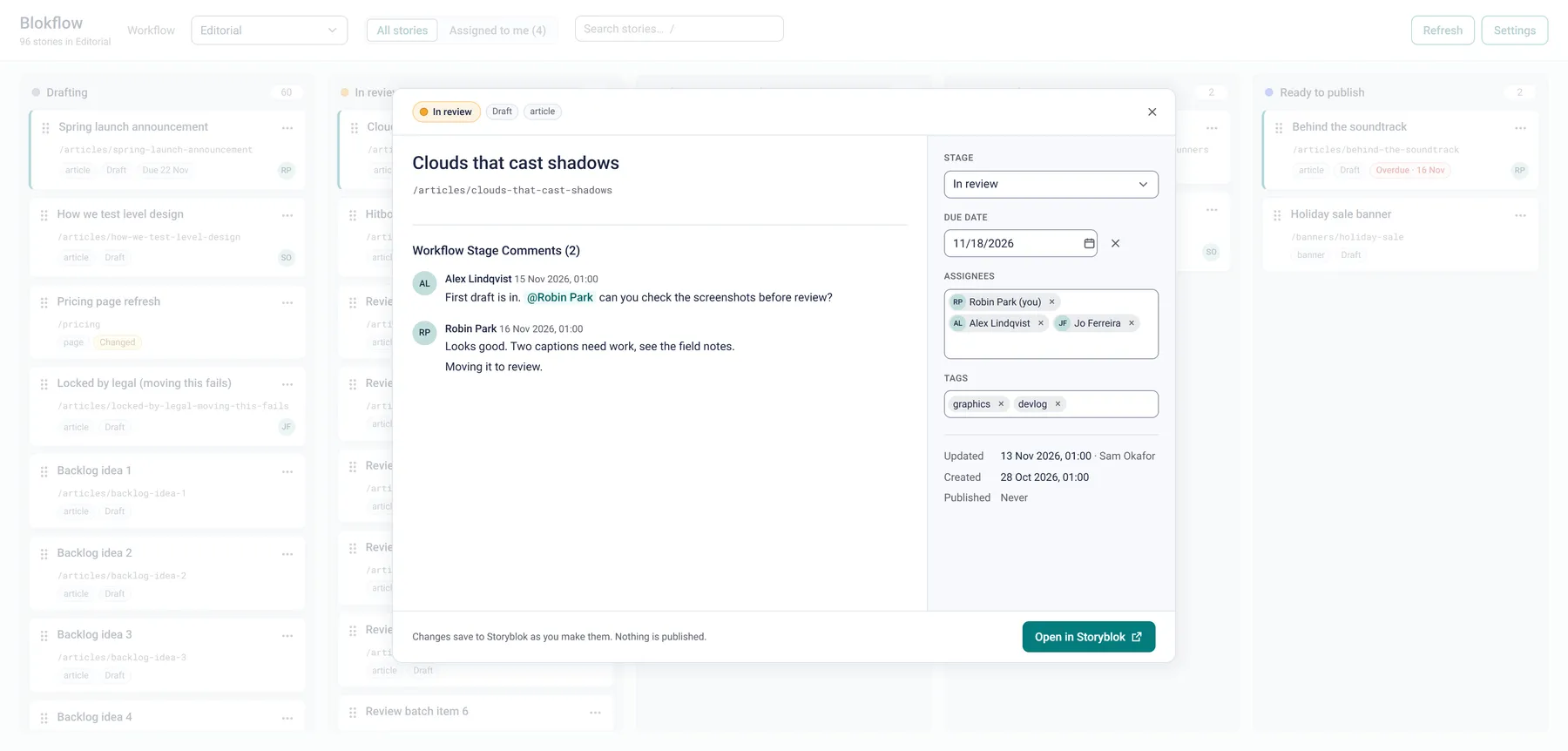
Click a card and a window opens with everything about that story: its stage, due date, assignees and tags to edit, its name and slug, the dates it was created, updated and published, and the comments people left on its workflow stages. Open in Storyblok takes you straight to the editor.
Board settings, like the workflow to open with, columns to hide and how wide they are, are saved per space for everyone. Inside Storyblok the board follows Storyblok's light or dark theme.
What the prompt brought along
None of the following was in my prompt. It all came from the generator, and it is exactly what took trial and error the first time:
- Sign-in inside an iframe. OAuth with a partitioned session cookie, and the small
/401page that brings the very first consent back into Storyblok. - Your own permissions, nothing more. Every read and write uses the signed-in person's token, so the board can only see and do what that person can in Storyblok.
- No database. Everything the board shows and changes lives in Storyblok. Its settings are space-level plugin settings.
- Manners with the API. It backs off and retries when Storyblok's rate limit answers, and loads the first page of three stages at a time.
- A native look. The controls are Vercel's ui-sdk components with Storyblok's design tokens on top.
- Tests and a README. The logic that turns Storyblok's data into columns, pages and settings has unit tests, and the README explains setup, deployment and every API call the board makes.
A board on ui-sdk
ui-sdk has no kanban component, but it has the building block for one: createTransfer, which moves items between lists with the pointer and the keyboard. Blokflow wraps it in a small "workflow board" primitive of its own, with columns and cards as parts. That is where the keyboard moves come from, and why dragging a card and moving it with Space and the arrow keys end in the same place.
What the API taught it
Building against real workflows turned up a few things about Storyblok's Management API that are worth knowing if you build something similar:
- Assignees are not in the story list. Only a single story has them. The board uses the list's
mine=truefilter to know which stories are yours, and the story window loads everyone. - Stage, due date and assignees are one change. In Storyblok they are saved together as a workflow stage change. Depending on the workflow, a move can clear the due date or the assignees, so the story window always sends all three together.
- Editing a name, slug or tags means sending the story's content back unchanged along with it. The board never publishes.
- Field-level discussions are not available to a plugin's token, so the board shows the workflow stage comments only.
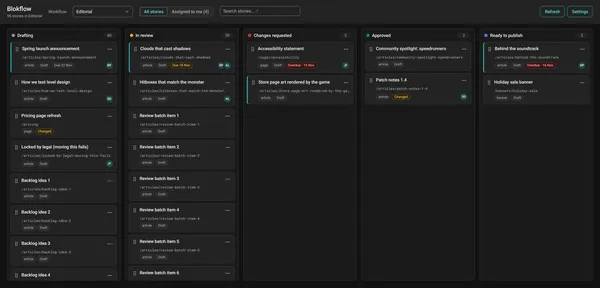 Inside Storyblok the board follows Storyblok's theme.
On Cloudflare this time
The translation editor runs on Vercel. Blokflow runs on Cloudflare Workers instead, through OpenNext. A Space Plugin is a Next.js app with a public URL, so it can live wherever Next.js runs.
One sentence, one app
The repository's first commit, an empty Next.js app, is from 9:23 this morning. The finished board was committed at 10:50.
Field types were the first step, a whole app the second. What I like most here is the part I did not have to write: auth, permissions, rate limits, storage, the look. One sentence described the app, and the generator brought the rest.
If you run a workflow in Storyblok, try Blokflow. And if you have an idea for your own app, the generator is one prompt away.