Writing a prompt contract: the rules that make AI-generated field plugins production-ready
Every rule in my generation guide, the bug it prevents, and how three agents helped me fix the guide itself
Don't describe one big "done". Describe many small ones.
TL;DR
- A "prompt contract" is a written set of rules an AI agent gets before it writes code. Ours,
GUIDE.md, is why three agents could each build a working Storyblok field plugin from one sentence. - Most rules exist to prevent one specific, boring bug: a field that crashes on old data, a story that looks changed every time you open it, a search that shows stale results.
- The agents found gaps in the contract. I folded their feedback into v0.2. Treat the guide as a test subject, not a finished spec.
In an earlier article I described a night in which three fresh AI agents each built a Storyblok field plugin from a one-sentence description, and all three built and passed their tests on the first try. That's a nice result, but the agents weren't the clever part. The instructions were.
This post walks through those instructions. It's for developers, but if you're on the marketing or content side, the short version is: don't bet on one big "done" at the end. Break the work into small steps, each with its own clear "done", and iterate fast. The more small checks you have, the less you depend on luck.
Everything here is in the repo, so you can read along: github.com/DominikAngerer/storyblok-field-wizard. The guide is generator/GUIDE.md, and the standalone copy-paste version is generator/PROMPT.md.
What a field plugin actually is
A field plugin is a small React app that Storyblok loads in an iframeAn iframe is an embedded page. inside the editor. It talks to the editor through one hook from the @storyblok/field-plugin library:
const plugin = useFieldPlugin<Content>({
  enablePortalModal: true,          // only if you use the modal
  validateContent: (c: unknown) => ({ content: normalize(c) }),
})
if (plugin.type !== 'loaded') return null
const { data, actions } = plugin
data gives you the stored value (content), the per-field settings an admin configured (options), and context such as the story and language. actions lets you save a value (setContent), open the field fullscreen (setModalOpen), or open Storyblok's asset picker (selectAsset). Whatever you pass to setContent ends up as JSON in the story.
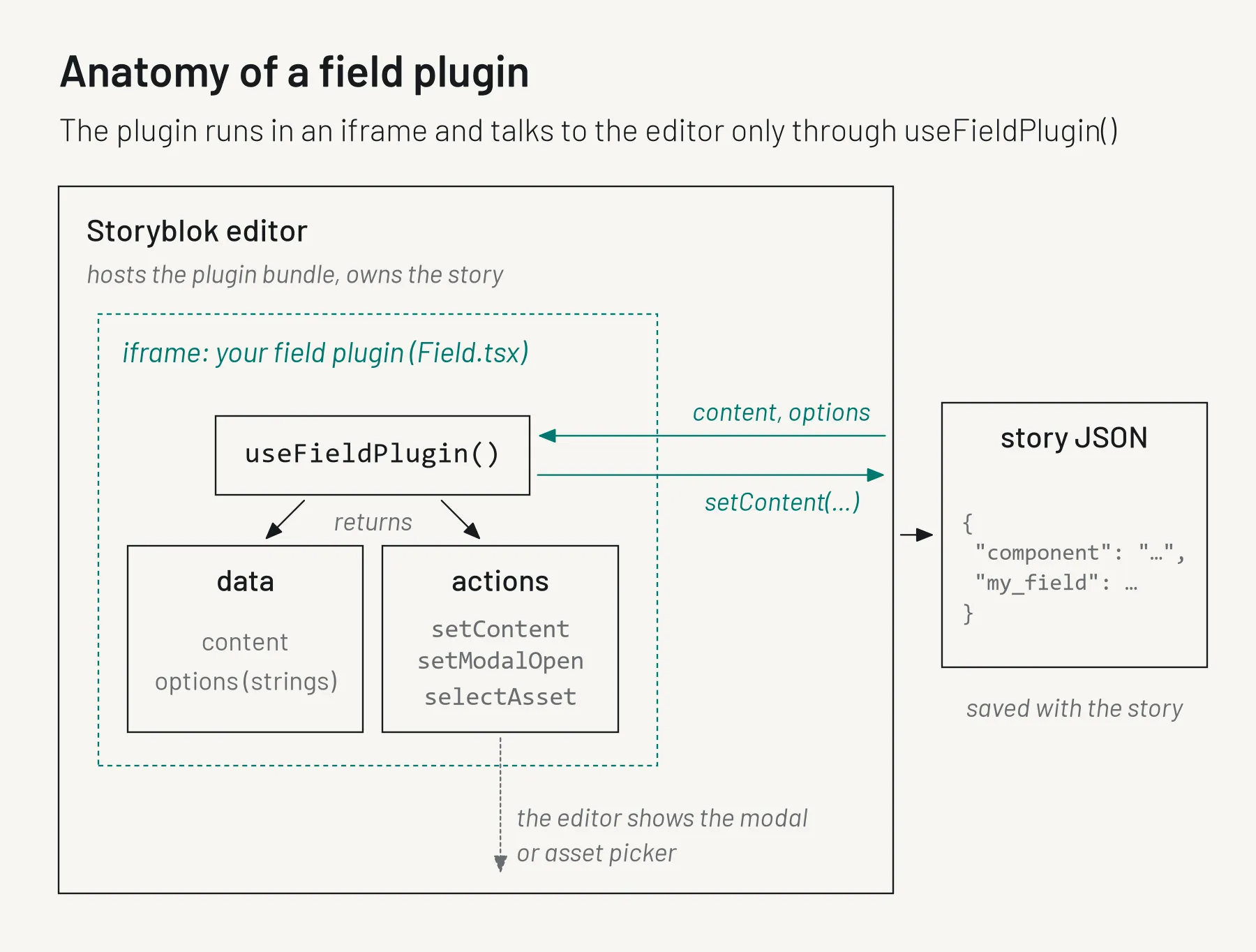
data, and everything it changes goes out through actions.That's a small surface. The trouble is in what you do with it.
Why write a contract at all
You can ask any capable model for "a Storyblok product picker" and get something that looks right. The problems show up later: in old stories, in a narrow side panel, on a slow network, or when an admin leaves an option empty.
GUIDE.md is my answer. It's one Markdown file that says what to produce, which files to touch and which to leave alone, how to design the value, how the UI should behave, and when the job is done. The same file is the Claude Code skill's instructions today and is meant to become the system promptThe standing instructions a model gets. for a hosted wizard later.
Value design: the rules that protect your content
The stored value is the part that outlives the code. Get it wrong and every story using the field carries the mistake.
Rule: validateContent accepts anything and never throws
The bug it prevents: a field that breaks on content it didn't expect. A new field has undefined as its value. A field whose shape changed between versions meets old values in existing stories. If the field throws on either, it can't render, and the editor can't fix the value through the field.
The color picker reads both its current object shape and an older plain hex string, and falls back to null for anything else:
const validateContent = (c: unknown): { content: Content } => {
  if (typeof c === 'string') {
    const hex = normalizeHex(c)
    return { content: hex ? { hex, name: null } : null }
  }
  if (c && typeof c === 'object' && 'hex' in c && typeof c.hex === 'string') {
    const hex = normalizeHex(c.hex)
    const name = 'name' in c && typeof c.name === 'string' ? c.name : null
    return { content: hex ? { hex, name } : null }
  }
  return { content: null }
}
The generated author picker did the same for lists, turning a single object or bare id into a one-item list and removing duplicates:
const list = Array.isArray(c) ? c : c == null || c === '' ? [] : [c]Rule: never write on mount
The bug it prevents: every time someone opens a story, it shows unsaved changes, even though nobody touched anything. That happens when a field "cleans up" its value with setContent as soon as it loads.
So setContent only runs after a user action. The author picker shows this: if a story has more authors than the maxAuthors option allows, it shows a warning and removes nothing. Trimming automatically would be a write nobody asked for.
Rule: store an id plus a small snapshot for external records
The bug it prevents: two opposite ones. Store only the id, and every frontend needs a second request to render a simple teaser. Store the whole record, and you carry stale, volatile data (ratings, stock) around in your content.
The product picker stores this:
{ "id": 121, "title": "iPhone 5s", "price": 199.99, "thumbnail": "https://cdn.dummyjson.com/…" }The guide also requires a sentence in the plugin's readme saying the snapshot is a copy from the moment of picking. Picking again refreshes it, and a frontend that needs live data fetches by id.
Rule: simple shapes, data not presentation, [] not null for lists
The bugs they prevent: frontends that must parse CSS out of a string, and .map() calls that crash on null. The guide asks for the simplest shape a frontend can use directly, stores "#00b3b0" rather than "background: #00b3b0", makes empty lists [], and makes an empty single value null.
Options: always strings, set per field
Options are the per-field settings an admin configures in the component schema, such as a palette or a maximum count.
Rule: options are always strings, and "" means unset
The bug it prevents: "false" is a non-empty string, so a check like if (options.allowCustom) is true even when the admin typed false. Number("") is 0, which can quietly become a limit of zero. Every generated field had to parse its options.
The color picker compares strictly:
const allowCustom = options.allowCustom === 'true'The author picker turns anything that isn't a positive integer into "unlimited":
export const parseMax = (v: string | undefined): number => {
  const n = Number((v ?? '').trim())
  return Number.isInteger(n) && n > 0 ? n : 0 // 0 means unlimited
}
Rule: the code default is the real default
The bug it prevents: a field that works in the local sandbox and misbehaves in production. You declare options in field-plugin.config.json with a value, and the sandbox uses that value. But deploying the plugin only carries the option names. The values have to be set per field in the component schema. If nobody sets them, your code sees nothing, so the code default must be sensible on its own.
The guide says the config value should normally equal the code default. When the code default is "unset" (like "no limit"), you may put an example value in the config so the option can be tried in the sandbox, and say so in the readme. The author picker does exactly that: unlimited in code, 3 in the sandbox.
UI rules: native to the editor
The bugs they prevent: fields that look foreign, overflow a 300–450px side panel, or can't be used with a keyboard.
The template ships a small set of classes (sb-field, sb-input, sb-btn, sb-chip and so on) and the editor's CSS variables (--sb_green, --sb_dark_blue, --light, --red and their tints). The guide asks for real <button> and <label> elements, visible focus, an empty state, inline errors and never alert().
Large UIs go into a fullscreen modal, with a compact summary inline. The recipe picker closes its modal on Escape:
useEffect(() => {
  if (!isModalOpen || !setModalOpen) return
  const onKey = (e: KeyboardEvent) => e.key === 'Escape' && setModalOpen(false)
  window.addEventListener('keydown', onKey)
  return () => window.removeEventListener('keydown', onKey)
}, [isModalOpen, setModalOpen])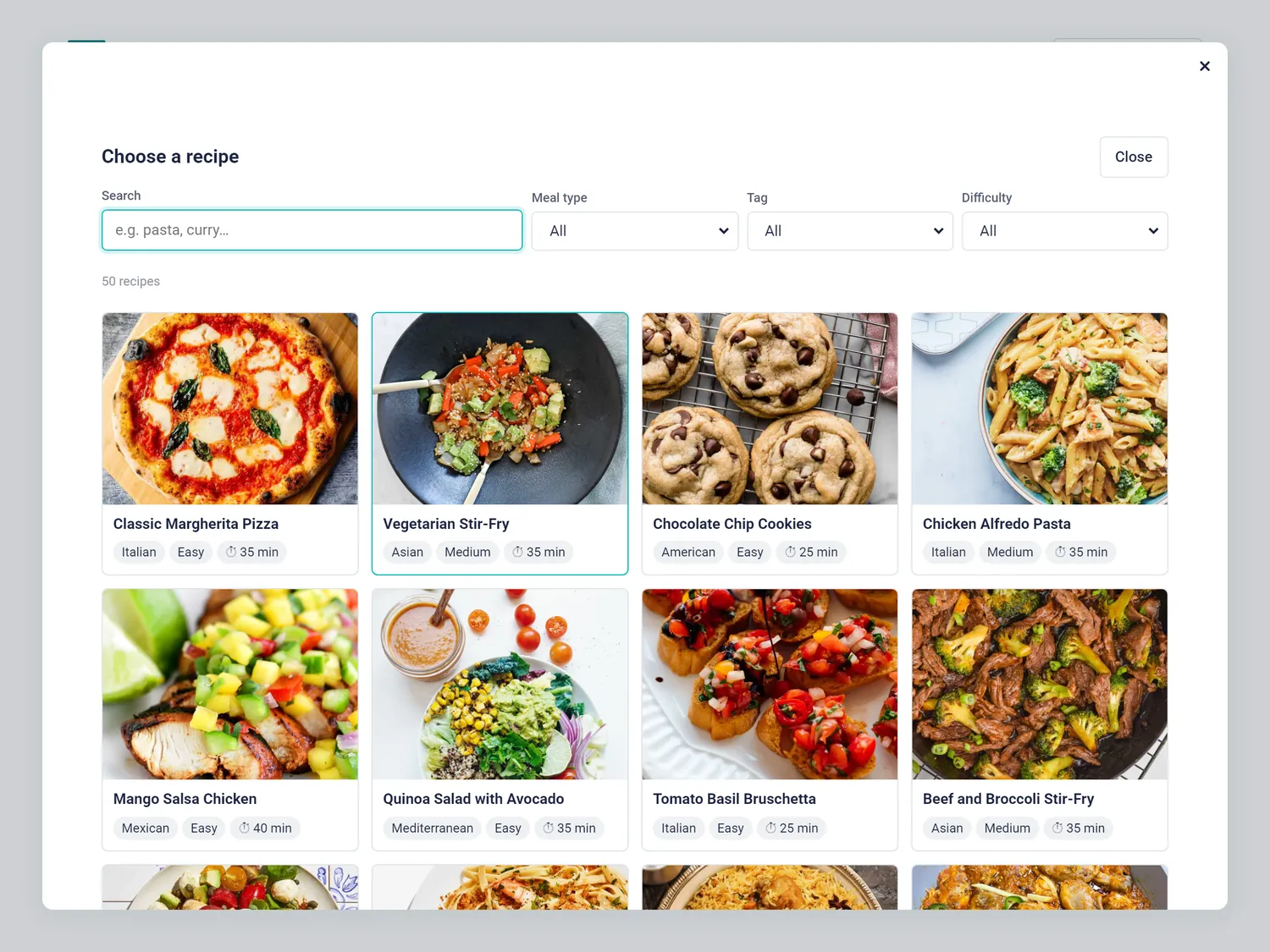
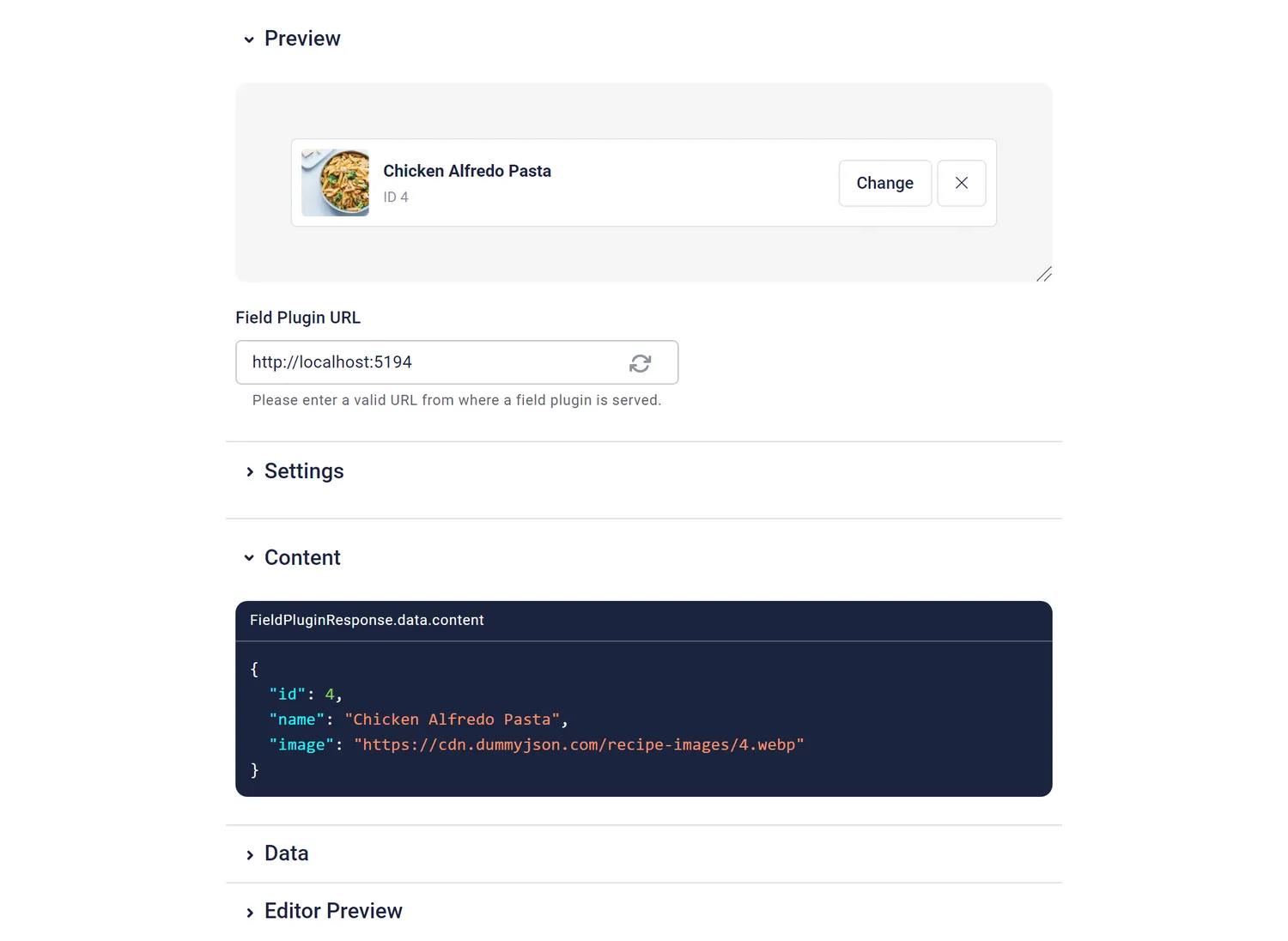
Network rules: assume the API is slow and messy
The bugs they prevent: a request per keystroke, results from an old query overwriting newer ones, a spinner that never stops, and a blank field when the API says "too many requests" (HTTP 429).
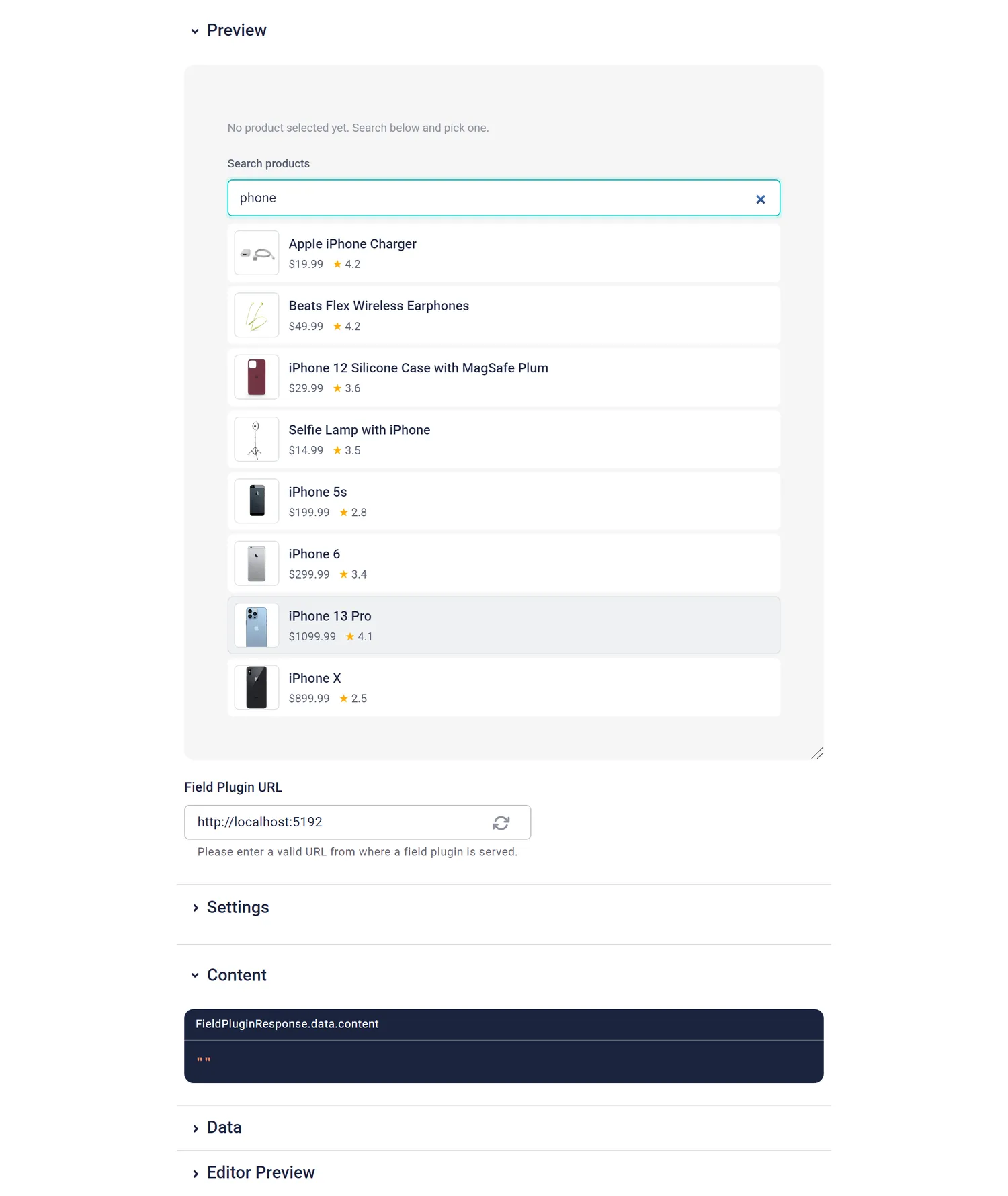
The guide asks for a ~300ms debounceWait until typing pauses., cancelling outdated requests with AbortController, a timeout of about 8 seconds, and visible loading, empty, error-with-Retry and 429 states. Here's the core of the product picker's search hook:
useEffect(() => {
  if (!enabled) return
  const controller = new AbortController()
  const debounce = window.setTimeout(async () => {
    const timeout = window.setTimeout(() => controller.abort(), TIMEOUT_MS)
    // fetch(..., { signal: controller.signal }), handle 429, set state
  }, DEBOUNCE_MS)
  return () => {
    window.clearTimeout(debounce)
    controller.abort() // a newer query cancels this one
  }
}, [query, category, limit, enabled, retryKey])
Two more rules came straight from real data. DummyJSON can't combine search and filter endpoints, so the guide says: send the most selective filter to the server and filter the rest in the browser. And because the recipe data has both "Snack" and "Snacks" and no "Hard" recipes, the guide says to only offer filter values that exist in the data.
Definition of done
The bug it prevents: "it looks finished" instead of "it is finished". An agent stops when the criteria are met, so the criteria had better be checkable:
npm run buildpasses, including type-checking.npx eslint srcis clean, react-hooks warnings included.npx vitest --runpasses, with tests for non-trivial pure logic such as parsing or contrast maths.PLUGIN.mddocuments the value shape with an example, every option with its code default, and a frontend snippet.
A field is only useful if the frontend developer knows what's in the JSON.
I read these as many small "dones", not one finish line. Each one is cheap to check, so check them after every step. That keeps iterations fast and problems small.
Good to know
- Option values are set per field.
field-plugin deployships option names only. Set the values per field in the component schema, and make the code default sensible.- Options are always strings.
"", a missing option and an unparseable value should all mean "use the default".- Import test functions explicitly. Import
describe,itandexpectfrom'vitest'. The globals aren't typed fortsc, so the build fails otherwise.- Spaces and field types come from the Management API and the field plugin CLI. The Storyblok MCP server doesn't cover those two, so that's what I used.
- Real APIs don't combine filters. DummyJSON couldn't mix search and filter endpoints, so the fields filter in the browser.
- CORS (cross-origin access) worked here. DummyJSON allows requests from
https://app.storyblok.com, so fields can call it straight from the editor iframe. Check this for any API you use.
How the agents improved the guide: v0.1 to v0.2
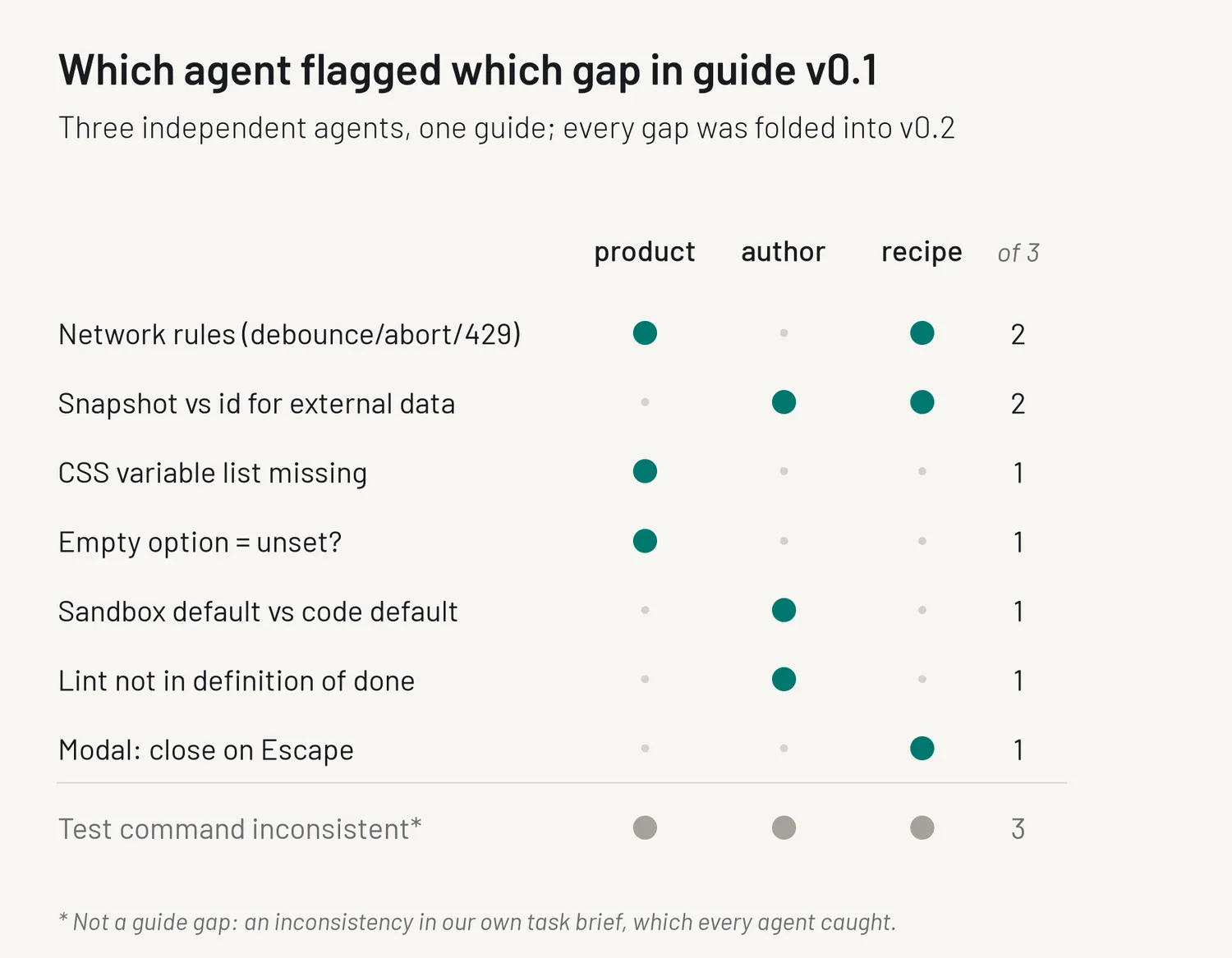
The three agents worked in parallel from v0.1 of the guide, without knowing about each other. The guide is written for agents, not for people, so the most useful reviewers are agents too: along with its field, each one reported where the guide had been unclear. Here's who flagged what:
| Gap in v0.1 | Flagged by | What v0.2 says |
|---|---|---|
| No list of CSS variables | product | Lists brand, neutral and status variables with tints |
| Does an empty option mean unset? | product | Missing, "" and unparseable all mean unset |
| No network rules | product, recipe | Debounce, abort, ~8s timeout, 429 and Retry states |
| Snapshot or id for external data? | author, recipe | Id plus small snapshot, documented as possibly stale |
| Sandbox default vs code default | author | Config value normally equals the code default |
| Lint not in definition of done | author | npx eslint src clean, react-hooks included |
| Modal: close on Escape | recipe | Close button, Escape, close after a pick |
Two gaps came up from two agents independently. Every other gap came from a single agent, and I fixed those too. A gap one agent hits today is one the next agent might hit tomorrow.
There was one more item, and it was on me: all three agents noticed that the test command in my own brief didn't match the template. That wasn't a guide problem, but it's a good reminder that agents read instructions more literally than people do.
The lesson I took from this: running a few agents in parallel on the same contract isn't only a way to get more done. It's a cheap test of the contract. Where they disagree or ask the same question, the instructions are thin. That's also why I call it v0.2 and not v1: three generated fields are a start, not a proof.
What this doesn't prove
Three generated fields, all of them pickers, built against dummy data in one night. I wrote the guide the same night, with this kind of field in mind. The tests are the agents' own and mostly cover pure logic. I'd treat these rules as a solid starting point that worked for me, not as a guarantee.
What's next
There are three ways to try this yourself: the copy-paste prompt that works with any coding agent, the Claude Code plugin, and the setup for Cursor and other agents via AGENTS.md. All three are already in the repo, and all three read the same guide.